Ana CostaCustomer support Pending
- Leave type
- Annual leave
- Dates
- 14–16 Oct 2026
- Days
- 3 working days
- Available
- 12 of 21 days 3 days held until you decide
- Approver
- Marco Bianchi (manager)
01 — People platform
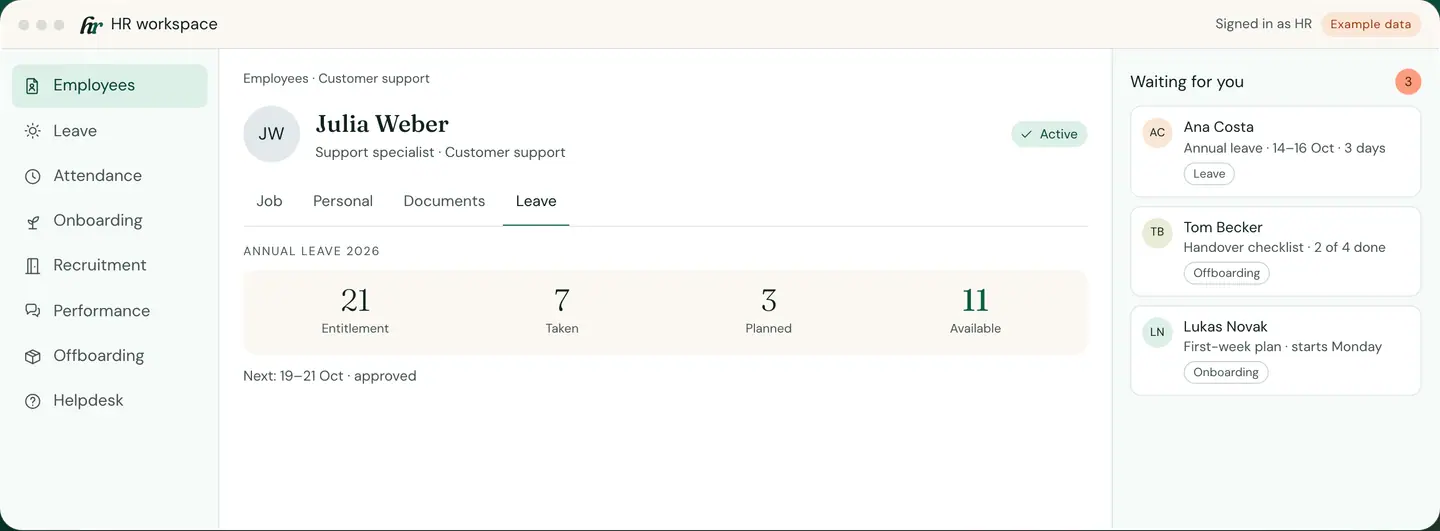
Employee records, leave, onboarding, reviews and exits in one place. Each request reaches the right manager, and every decision stays on the employee’s file.
One-off setup, monthly licence, hosted in the EU, supported by the team that builds it.
HR · Example data
What do you want to sort out first?
02 — A year in the record
A year in one employee’s file, screen by screen. Every screen is the product, shown with example data.
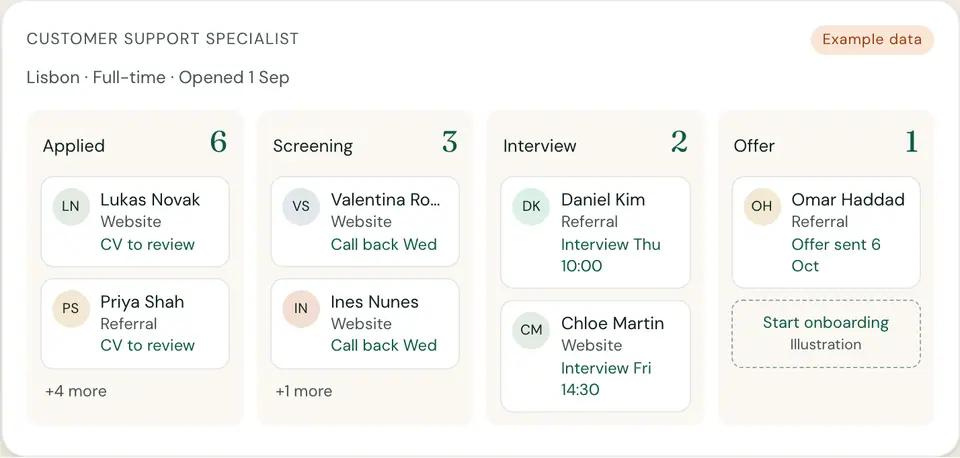
01 Hire
Positions, applications and interview notes in one pipeline. The person you hire moves straight into onboarding.
02 Onboard
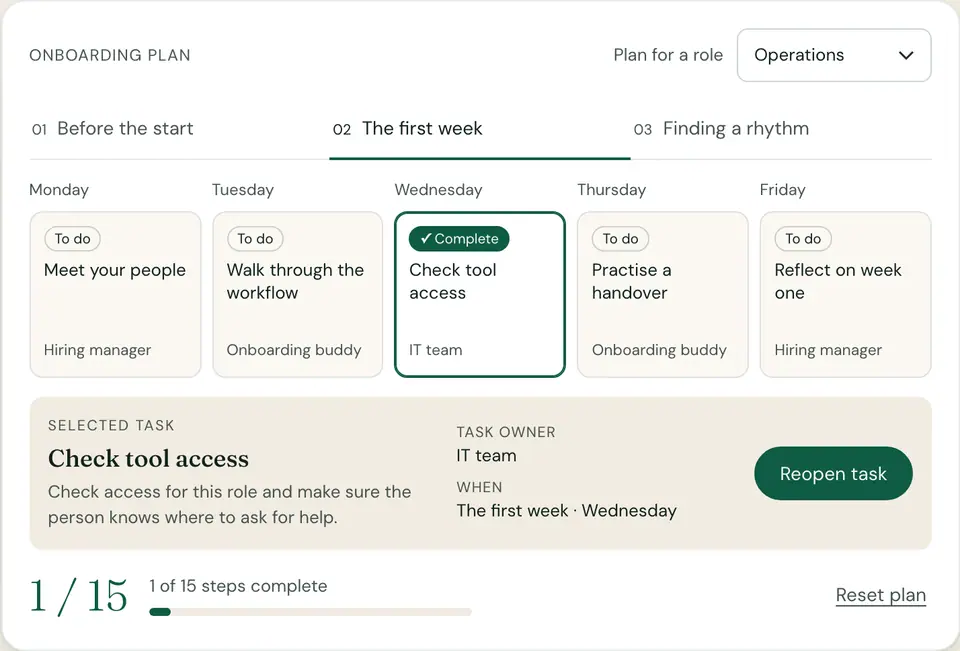
Every task has an owner and a day: HR, the manager, IT or a buddy. Progress is visible to HR and the manager.
03 Time off
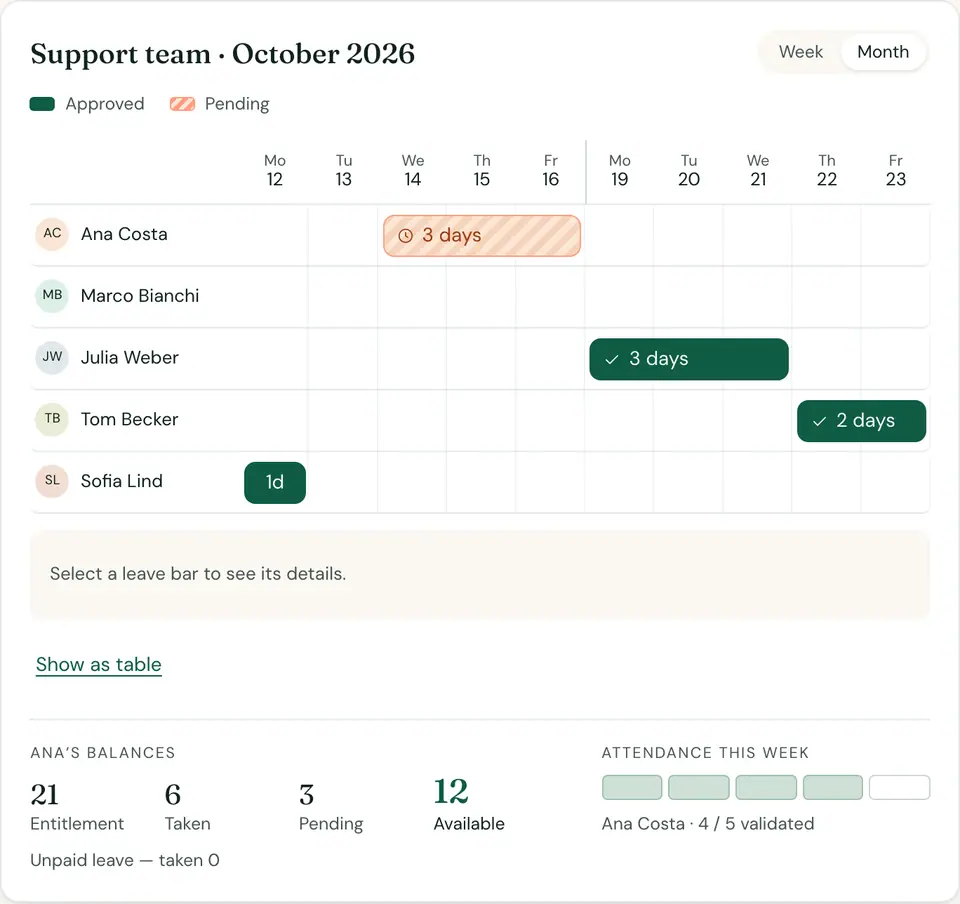
The team calendar shows approved and pending leave side by side, and balances update the moment a request is approved.
04 Review
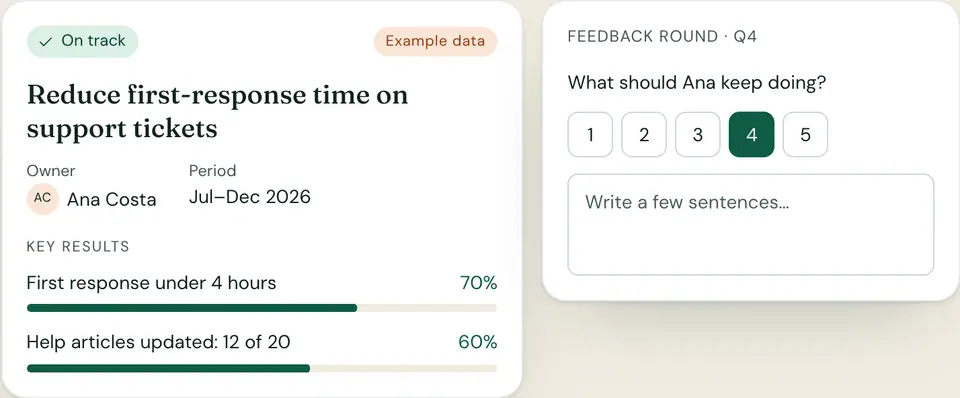
Objectives, key results and feedback rounds with your own questions. When review time comes, the history is already on the file.
05 Exit
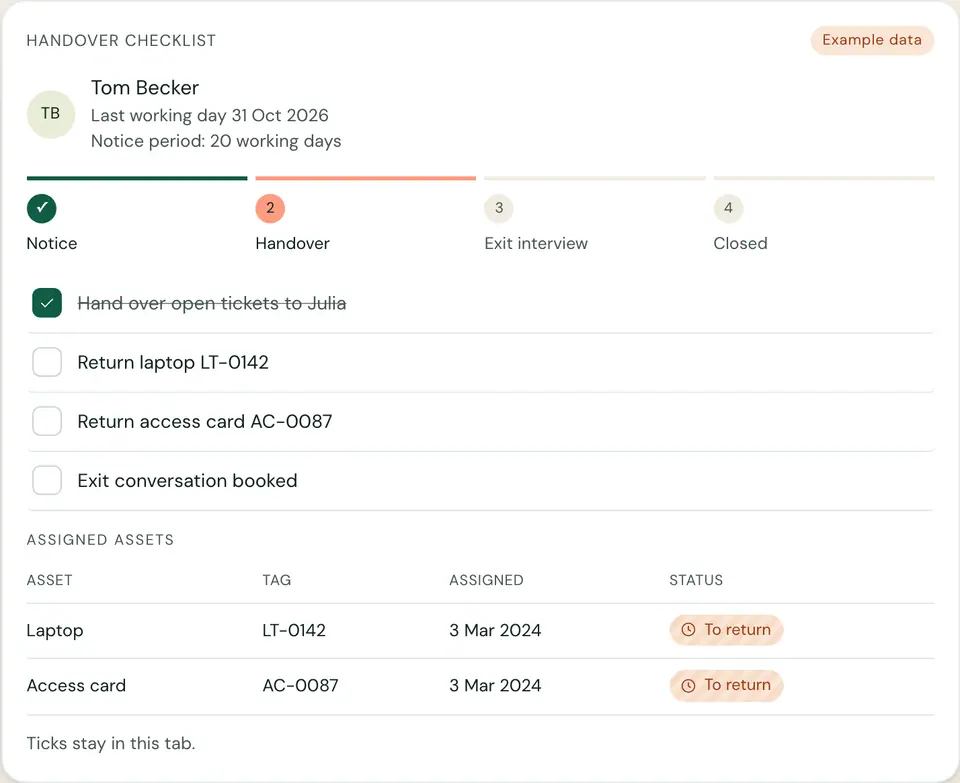
Handover, the exit conversation and returned equipment are ticked off in one list, and the record stays complete after the person leaves.
Example data
03 — Try it
Pick a moment in someone’s time with you. The record stays the same; only the work around it changes.
Open a position, collect applications and move candidates through the stages you define. Interviewers leave notes in one place, and the person you hire moves straight into onboarding.
Build an onboarding plan per role. Each task has an owner — HR, the manager, IT or a buddy — and a day it is due, so nobody wonders who was meant to set up the laptop.
Choose a role, explore the weeks, and open a task to mark it complete. Your changes stay in this tab.
Requests, approvals, balances and attendance side by side — the whole flow is laid out just below.
Set objectives with key results, check in during the year and run feedback rounds with the questions you choose. When review time comes, the history is already there.
Reduce first-response time on support tickets
Key results
What should Ana keep doing?
Start an exit with the notice period and last working day. Handover tasks, the exit conversation and returned equipment are ticked off in one list, and the record stays complete after the person leaves.
| Asset | Tag | Assigned | Status |
|---|---|---|---|
| Laptop | LT-0142 | 3 Mar 2024 | To return |
| Access card | AC-0087 | 3 Mar 2024 | To return |
Ticks stay in this tab.
04 — Time off
Employees check their balance and ask for days off from their phone’s browser. The team calendar shows approved and pending leave side by side, so a manager can say yes without checking a spreadsheet first. Balances update the moment a request is approved, and attendance sits next to it.
Hi, Ana
Annual leave 2026
Before she sends her 14–16 Oct request
New leave request
Support team · October 2026
| Person | Type | Dates | Days | Status |
|---|---|---|---|---|
| Ana Costa | Annual leave | 14–16 Oct 2026 | 3 days | Pending |
| Julia Weber | Annual leave | 19–21 Oct 2026 | 3 days | Approved |
| Tom Becker | Annual leave | 22–23 Oct 2026 | 2 days | Approved |
| Sofia Lind | Sick leave | 12 Oct 2026 | 1 day | Approved |
| Marco Bianchi | No leave in these two weeks | |||
She picks the dates and leave type; her remaining balance is shown before she sends.
The request lands with the manager set on her file, with the team calendar beside it.
The decision, the date and who made it stay on Ana’s file. Payroll can pick it up from there.
Leave rules — types, entitlements, carry-over, approvers — are set up with you during implementation.
05 — Modules
Which ones you start with is agreed in your scope.
Employees · Customer support
Annual leave 2026
Next: 19–21 Oct · approved
One file per person, with the access each role needs.
Requests, approvals and balances without email threads.
Time worked, next to time off.
A planned first week for every new colleague.
Positions, candidates and interviews in one pipeline.
Objectives, check-ins and feedback over the year.
Exits handled carefully, equipment accounted for.
Questions to HR, answered and tracked.
Payroll is a separate RDCopilotOS module, and REGES is the localisation module for employers in Romania. See how they connect Who sees what
06 — Access
Access follows the role a person has. An employee sees their own file, a manager sees their team, HR sees what HR needs. You agree the rules with us, and we test them with real scenarios before go-live.
| Area | Employee | Manager | HR | Administrator |
|---|---|---|---|---|
| Personal details | Own only | — | Edit | Edit |
| Job and contract details | Own only (view) | Team (view) | Edit | Edit |
| Documents | Own only | — | Edit | Edit |
| Leave requests | Own only | Team (approve) | Edit | Edit |
| Attendance | Own only | Team (validate) | Edit | Edit |
| Performance reviews | Own only | Team | View | Edit |
| Users and roles | — | — | — | Edit |
Your HR data runs on EU infrastructure; the location is written into your quote.
Scheduled backups, with the frequency and where the copies are kept agreed in your quote.
Each employee’s history in one place, on their own file.
07 — Connections
| No. | From | To | What moves | Who owns it |
|---|---|---|---|---|
| 01 | HR | Payroll | Approved leave, validated attendance, job changes | HR prepares and approves the inputs; Payroll does the calculation. |
| 02 | HR | REGES | For employers in Romania: new contracts, changes, suspensions and terminations | HR keeps the record; the REGES localisation module handles the filing. |
| 03 | HR | Reports | Headcount, leave and turnover figures | HR is the source; Reports puts them next to the rest of your business figures. |
| 04 | HR | Integrations | Data another system you already use needs | Scoped with you and built by our team in RDCopilot Integrations. |
RDCopilot HR does not calculate payroll and does not file with national employee registers itself. Each connection above is defined in your quote, so you know exactly what moves where.
Each person signs in to the HR workspace with their own account, and the role HR gives them decides what they see.
Part of RDCopilotOS
RDCopilotOS connects operations, finance, people, customers, data and compliance. Start with HR and connect the modules you need, with every handoff defined in your quote.
08 — Implementation
Every company starts from a different place, so timings are set in your quote. The steps are always the same.
Step 1
We look at how you handle leave, onboarding and records today, and agree which modules you start with.
You leave with: a scope, a timeline and a quote
Step 2
Departments, job positions, leave types, entitlements and approvers are set up to match how you actually work.
Step 3
We import your employee list and opening leave balances from the files you already keep, then check them with you.
| Column in your file | HR field | Status |
|---|---|---|
Full name | Full name | Mapped |
Start date | Date joined | Mapped |
Team | Department | Mapped |
Leave days left | Opening leave balance | Check with you |
Personal phone | — | Not imported |
42 rows read · 1 column to check with you
Step 4
Roles are set and tested with real scenarios: a request, an approval, a new joiner, a leaver.
Step 5
Short sessions for HR and managers, then ongoing support from the team that builds the product.
09 — Pricing
One card: what happens before go-live, and what keeps running after it.
Once · Before go-live
Scoping, configuration of your structure and leave rules, data import, role testing and training.
Set in your quote, according to the scope we agree and the state of your current data.
Go-live
Every month · From go-live, month by month
Hosting in the EU, updates, scheduled backups and support from our team.
The monthly licence is set in your quote, according to the scope we agree.
Exact terms are written into your quote.
Not sure what to include? Book a walkthrough first.
10 — Questions
No. Salaries are calculated in RDCopilot Payroll. HR keeps the approved leave, attendance and job changes that Payroll needs, and the handoff between the two is defined in your quote.
Not by itself. HR is where the employee file lives; filing goes through a localisation module for each country. For employers in Romania, the RDCopilot REGES module files to REGES-ONLINE, the national employee register.
On EU infrastructure, at a location written into your quote. The data is yours: you can export it, and we agree backup frequency and retention with you before go-live.
Yes, that is a common starting point. We prepare the import of your employee list and opening leave balances from your files and check the result with you before anyone uses it.
It depends on how many people you have, which modules you start with and how tidy the current data is. You get a timeline with your quote, before you commit.
Yes. You can start with employee records and leave, then add onboarding, reviews or recruitment later. The monthly licence is set in your quote, according to the scope we agree.
The employee views are responsive and work in a phone browser, without installing anything. Which actions employees can take themselves is agreed in your scope, and we show you the views before you decide.
11 — Next step
How many people, which requests take the most time, and where the data lives now. We come back with a scope, a timeline and a quote.
From idea to implementation
Design employee-record access around real tasks, approved team membership and document boundaries, then test screens, exports and changes in responsibility.
Read guideConnect leave requests to approved HR policies, named reviewers, delegation and calendar handoffs, with visible decisions and clear handling of later changes.
Read guideConnect HR onboarding with equipment, approved application access and first-day preparation, using named owners, dependencies and evidence of completed handoffs.
Read guide© 2026 R&D COPILOT Made in EU Contact form